
Learn how to transfer funds from your Pax2pay funding account, and how to download outbound transfer confirmations on the portal.
SEPA - Faster Payments - SWIFT
You can initiate SEPA, Faster Payments, and SWIFT transfers from your funding account, or transfer funds between funding accounts of the same currency, directly through our portal.
When sending funds from your Pax2pay account, we ensure that payments are processed via the fastest avaliable route at the time.
By default, EUR-to-EUR payments are processed via SEPA Instant Transfer. If a payment cannot be processed via SEPA Instant, we will send the payment as a SEPA Credit Transfer instead.
You must enable 2FA before you can make a transfer out using the portal. If you need assistance with this please click here.
You can select to pay an existing beneficiary, or pay someone new and add them as a beneficiary for future transfers if you wish. The clip below demonstrates just how easy it is!
As shown in the above clip, you can now download PDF transfer confirmations for outbound transfers once successfully submitted.
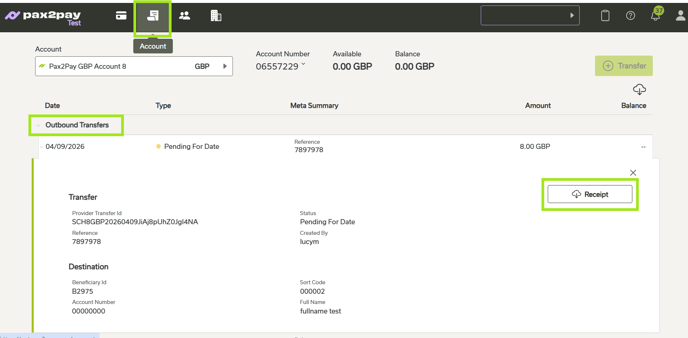
Previous outbound transfer confirmations can be downloaded anytime from the Accounts Rooms under the Outbound Transfer tab, as per the below screenshot.
If you do not have the transfer functionality visible please raise a ticket with our customer support team here.