![pax2pay-dark-symbol 300dpi.png]](https://support.pax2pay.com/hs-fs/hubfs/pax2pay-dark-symbol%20300dpi.png?height=50&name=pax2pay-dark-symbol%20300dpi.png)
You can set a minimum transaction amount when creating a card to add an extra layer of security.
Fraudsters often attempt low value transactions, by setting a minimum transaction limit any authorisations below that amount will be declined.
Ways we can configure the Minimum Transaction Limit:
1.Account-Level Configuration
We can set a minimum transaction limit that can be applied across all cards created under a specific account.
This is configured as a percentage of the card's total limit. For example, if the minimum limit is set at 90%, any transactions below 90% of the full card limit will be declined.
2. Per-Card Configuration
Minimum transaction limits can also be applied to specific cards created via the portal or API.
In this case, the minimum is set as a fixed amount rather than a percentage. This will override any account-level setting for that card.
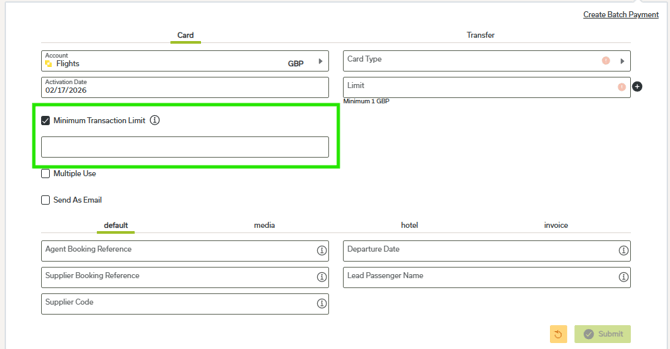
If configuring via the API, please refer to the relevant API documentation for set up details.
Key information
- Where a card has a scheduled limit change, the minimum transaction amount cannot be set to less than the smallest scheduled limit.
- The minimum transaction limit can not be edited after the card has been created. If you make a mistake, the card will need to be cancelled and reissued.
- For cross currency transactions, the minimum transaction amount is fixed when the limit is set and won't change with fluctuations in exchange rate.
- Minimum transactions are currently available for card created through our payment partner, Modulr.
If you would like access to the minimum transaction limit feature, please raise a ticket with our customer support team here.