Merchant Locking is a new feature that allows you to restrict a virtual card so it can only be used with one chosen merchant.
Who can use Merchant Locking?
Merchant Locking is available to UK customers on the Pax2pay licence and works with Visa and Diners Club cards.
How Merchant Locking works
We set up your merchant list for you
When we enable Merchant Locking on your account, a selection of leading travel suppliers will be added by default. You can view your approved merchants at any time in the Payments Room.
You choose which cards to lock
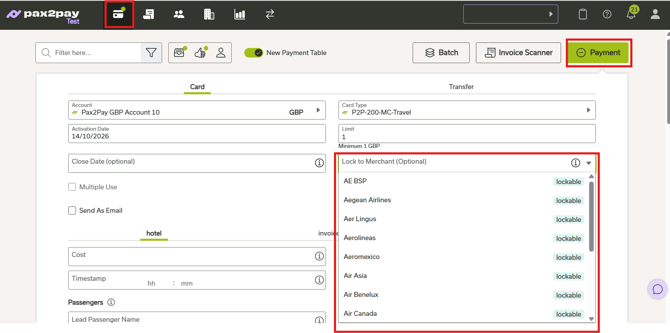
When you create a virtual card, you can select a merchant from the Lock to Merchant list. The card will then only work with that merchant and any payments to other suppliers will be declined. If you don’t select a merchant, the card can be used with any supplier, and it won’t have the same level of protection.
How to lock a card to a merchant
- Go to the Payments Room and select +Payment.
- Choose your Pax2pay Payment Account and Card Type. The Lock to Merchant list will appear.
- Select the merchant you want to lock the card to.
- Add any other details you need, such as card controls or metadata.
- Click Submit.
FAQs
Is Merchant Locking enabled by default? No, it must be configured by our support team. Once configured, you need to select the Merchant from the drop down menu for the card to be locked to the specific merchant.
What should I do if a supplier I need isn’t on my Lock to Merchant list? Contact our Support team and we’ll check whether we can add the supplier for you.
Will Merchant Locking still work if a supplier’s name appears differently?
Yes. Merchants don’t always appear under the same name, so Merchant Locking will recognise different name variations, as well as Merchant Category Codes (MCCs) and categories. A slightly different name on your statement won’t cause a payment to fail.
Does Merchant Locking work for Modulr cards?
Not at the moment. Merchant Locking is only available on Pax2pay accounts on our own licence. If you are unsure, please contact our support team.
Does merchant locking work for cards created via the API? Yes. Please find the relevant API documentation here.
Although merchant locking has been extensively tested and is designed to restrict transactions in line with the configured controls, there may be circumstances that affect its effectiveness. While the feature is intended to reduce the risk of unauthorised transactions, it cannot guarantee the prevention of all fraudulent activity.
Need help? Raise a ticket with our support team.